Every swing, measured on your wrist.

Slice turns your Apple Watch into a tennis swing tracker. It learns your strokes, scores every forehand, backhand and serve, coaches you through your matches and tells you where your game is going.

For iPhone and Apple Watch. Screens shown are from the current beta.

9:41
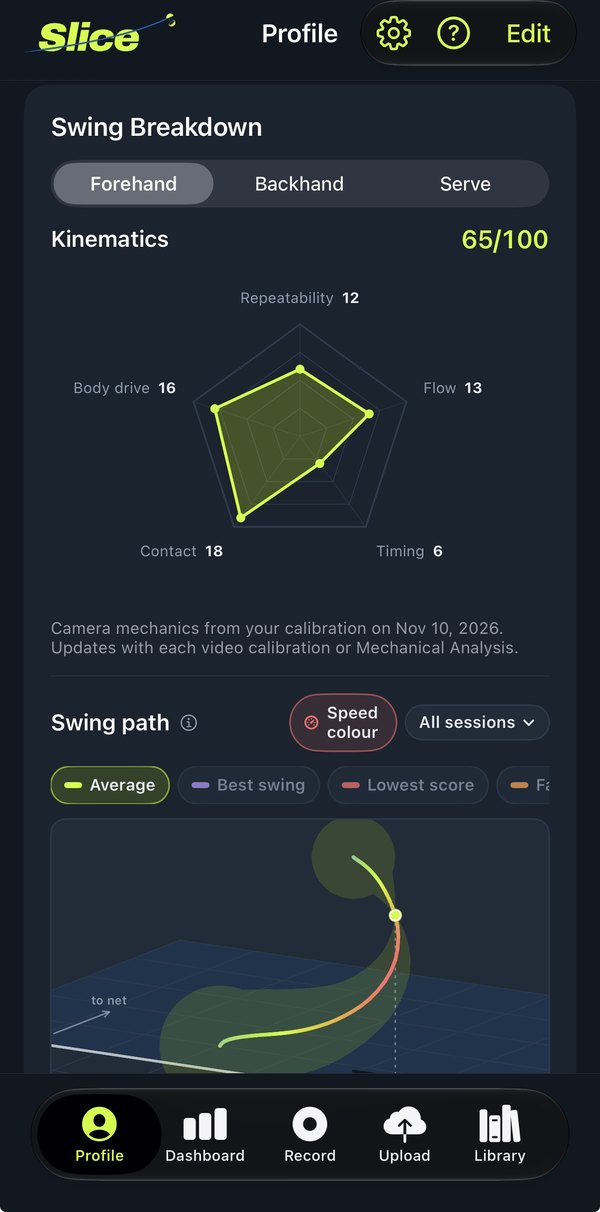
Slice profile, swing breakdown: forehand kinematics 65 out of 100 from the camera, with the 3D swing path below
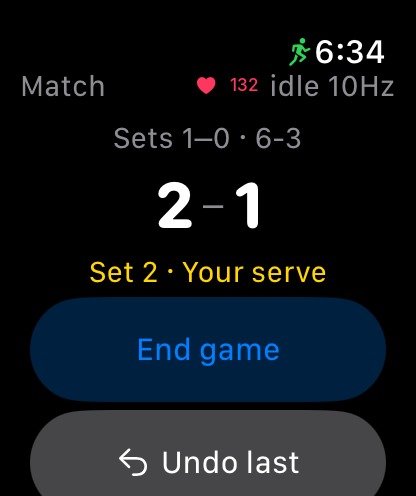
Slice on Apple Watch during a match: sets 1–0, 2–1 in set 2, your serve, heart rate 132

Video shows the swing. Slice shows what changed.

You can film yourself every day and still not know whether Tuesday's forehand was better than Saturday's. Slice measures each swing from the wrist, compares it with your own reference, and turns the difference into something you can work on.

Measured, not guessed

Wrist speed, wrist travel, swing path and the speed you carry through contact, on every shot.

Built on your swing

Guided calibration teaches Slice how you hit, so every swing is compared with you, not an average player.

A coach that read the whole match

Reports on every session, answers during a match, and a full assessment of your game once you've played enough.

Calibrate once. Then watch every swing back.

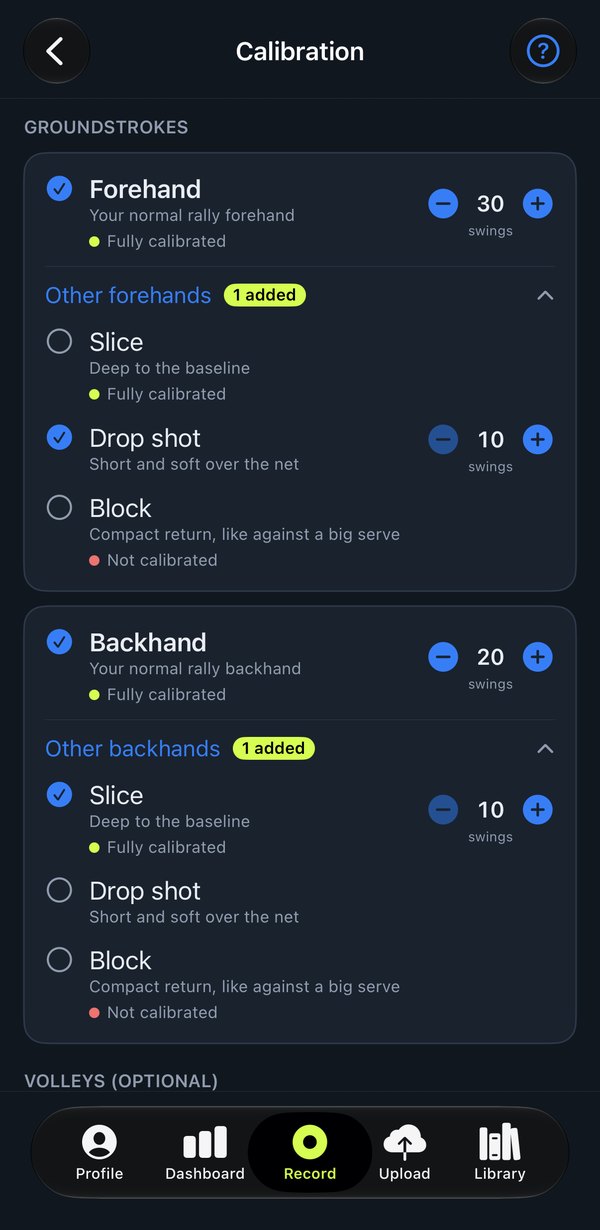
Pick the shots you want Slice to learn and send the plan to your watch. It walks you through each block on the wrist while your phone films from a tripod, and every clip is cut to the swing it belongs to.

  • Choose your shots and reps, from your rally forehand down to drop shots, slices and blocks.
  • Each shot shows whether it's calibrated yet. Video is optional.
  • Replay any swing at ½× or ¼× with the biomechanical model drawn over you.
  • Jump straight to backswing, forward swing, contact or forward reach.
9:41
Slice calibration screen: forehand 30 swings and backhand 20 swings, fully calibrated, with drop shot and slice variations added
9:41

Left: the calibration screen. Right: a screen recording of a calibration backhand at ½× with the biomechanical overlay.

One score per swing, and why.

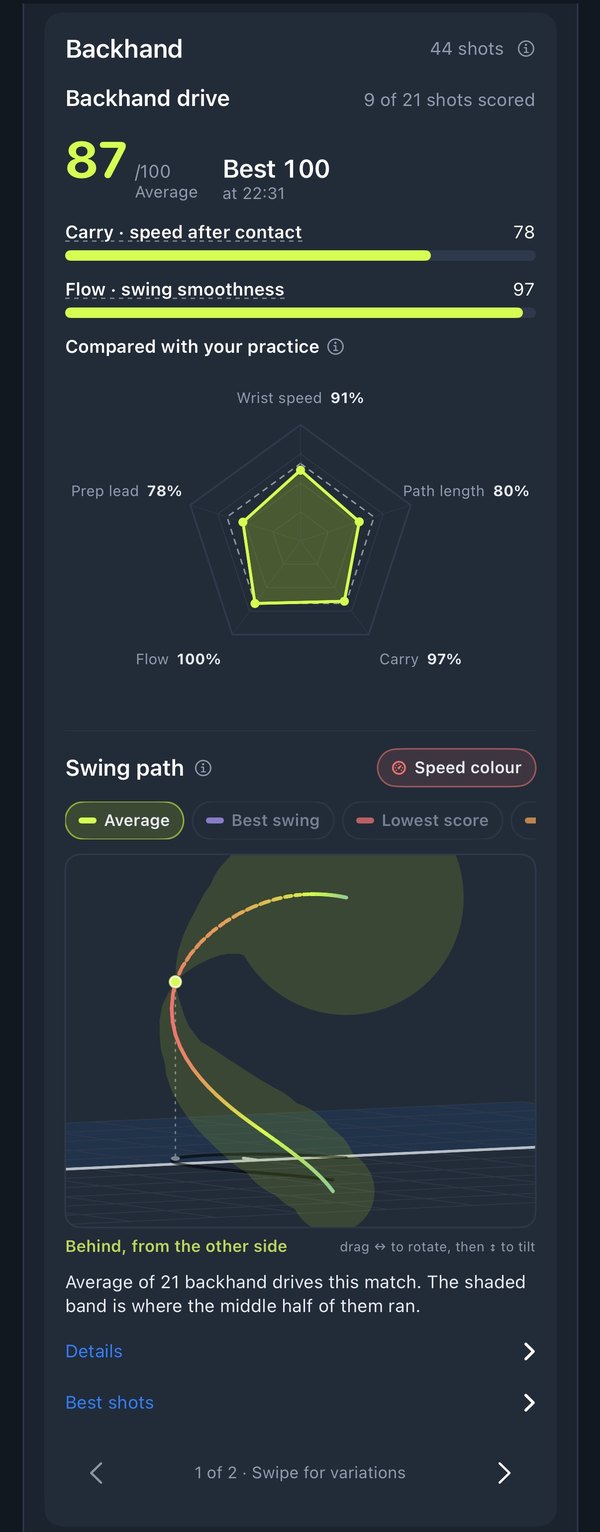
Every stroke gets its own card. The Swing Score is out of 100: the average of how much speed you carry through contact and how smooth the swing is. Under it, Slice compares the session with your practice and draws your swing path in 3D.

  • Carry is the wrist speed you keep after contact, so stopping at the ball shows up.
  • Flow is how smooth the whole swing is, start to finish.
  • Calibrate with video and you also get a kinematics score from the camera: repeatability, flow, timing, contact and body drive.
  • Drag the swing path to rotate it. Colour it by speed, or compare your best and lowest-scoring swings.
9:41
Backhand drive card: average 87 out of 100, best 100, Carry 78, Flow 97, a radar comparing the match with practice, then the 3D swing path

From the app. It scrolls on its own; scroll it yourself to take over.

Finish the match. Read the coach's notes.

Keep score on your watch and Slice ties every swing to the game it was in. After the match, the Coach's Report reads the whole thing: what held up, what slipped, and the games where it changed.

  • A whole-match read, then short notes game by game.
  • Highlights and one thing to work on for each stroke.
  • Stuck mid-match? Ask the coach from your phone at a changeover, twice per match.
9:41
Report
Match · Sat 2:10 PM · 6–4 4–6 10–7
AI Coach's ReportPREMIUM
Match coach Ask coach · 1 left
My serve keeps going into the net.
Your serve speed hasn't dropped, so keep swinging. Toss a little further in front and reach up to the ball.

Sample match and report.

Earn the full read on your game.

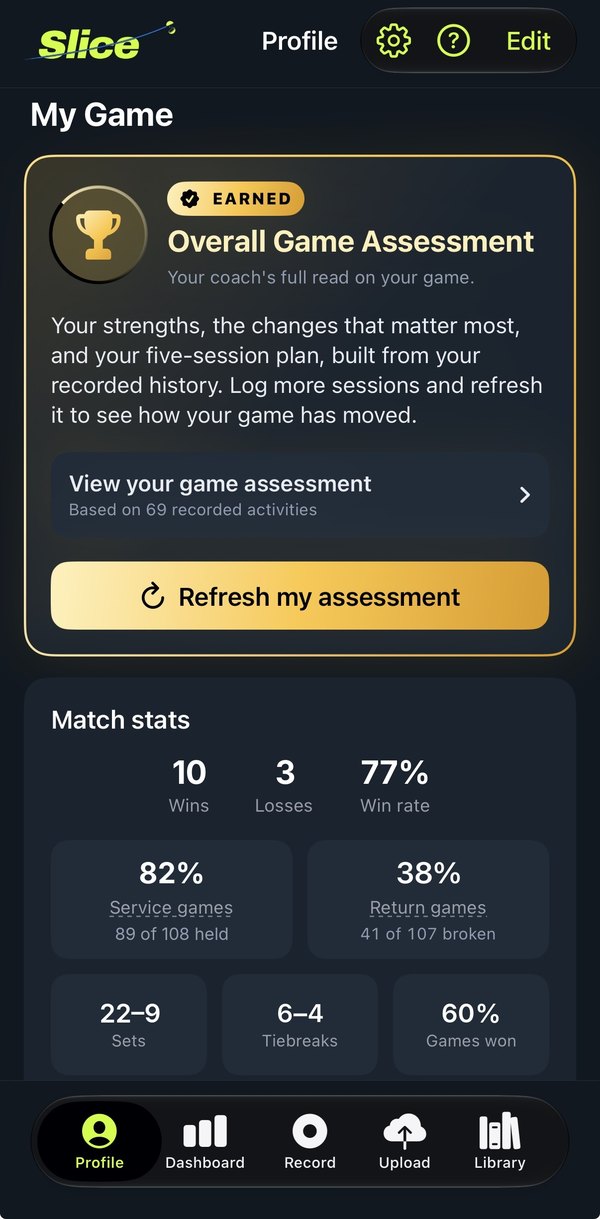
Record nine sessions and one calibration and the Overall Game Assessment unlocks as a trophy. Slice's most advanced coaching model studies all of your recorded tennis together, matches first.

  • A verdict on each stroke: weapon, solid, developing, inconsistent or work on.
  • How your matches are won and lost, and the one or two changes that lift you most.
  • A five-session plan, refreshed as you log more tennis.
  • Match stats alongside it: record, holds and breaks, sets, tiebreaks and games won.
9:41
Profile, My Game: Overall Game Assessment earned, with match stats of 10 wins and 3 losses
9:41
Your game assessment
Based on 14 recorded activities

Your game right now

A forehand-first baseliner whose backhand decides close sets.

Stroke by stroke

Forehand WEAPON

Your highest-scoring stroke in matches, and it holds its speed into third sets.

Backhand INCONSISTENT

Two versions show up. When Flow stays high you win the game far more often.

Serve SOLID

Steady speed from first game to last.

Your next five sessions

1Backhand finish · 3×20 crosscourt, full follow-through
2Backhand under fatigue · same drill after 20 min of rallying
3Forehand patterns · inside-out to open court
4Serve + first ball · 30 serves, play the next shot
5Match play · score it on your watch

Left: from the app. Right: recreated with a sample assessment.

And the rest of the bag.

Slice runs on the watch while you play and does the heavy lifting on your iPhone afterwards. No extra sensors, no clip-on hardware.

From first hit to game point.

Three steps, and the first one you only do once.

  1. 15

    Calibrate

    Pick your shots, send the plan to your watch and hit the reps. Around 20 of each drive and 10 of each serve. See calibration

  2. 30

    Play

    Start a Match, Rally, Ball Machine or Serve Practice session from the watch and keep score with a tap. Slice logs every swing. See the Swing Score

  3. 40

    Review

    Your iPhone scores every swing, writes up the session and, over time, assesses your whole game. See the coach

Honest about what a wrist can tell you.

A sensor on your wrist is very good at some things and blind to others. Slice reports the first and doesn't pretend about the second.

What Slice measures

  • Stroke type and variation
  • Peak wrist speed and wrist travel
  • Speed carried after contact
  • Swing smoothness
  • Swing path, in 2D and 3D
  • Match score, point by point

What it doesn't

  • Racket-head speed. These are wrist values, built for comparing you with you.
  • Footwork and court coverage. Arm swing drowns them out.
  • Where the ball landed. Best shots rank the motion, not the outcome.

Questions

What do I need?

An iPhone and an Apple Watch. The watch goes on your hitting wrist while you play.

Do I have to film myself?

No. Video is optional during calibration. Everything else comes from the watch.

How long does calibration take?

One short session at the ball machine or with a hitting partner. You can calibrate a few shots now and add the rest later.

When does the Overall Game Assessment unlock?

After nine recorded sessions and one calibration. You can refresh it as you log more tennis.

When can I get it?

Slice is in a private TestFlight beta now, with the App Store release to follow. Join the list below to get an invite.

Get Slice on your wrist first.

Beta spots go out in small batches. Leave your email and we'll send a TestFlight invite when the next one opens.